

A Full-Time Vanlifer Breaks Down When Each Service Is Best, With Expert Input

In This Article
-
An overview of TravlFi vs Starlink
-
How TravlFi works for RVers
-
How Starlink works for RVers
-
Side-by-side comparison of setup, speed, coverage, and cost
-
Which service is right for you
-
Why some RVers combine both
-
FAQs
As someone who works full-time while living on the road, having reliable internet is non-negotiable. Whether it's uploading blog posts, leading virtual fitness sessions, or managing deadlines for multiple publications, staying connected isn't just a luxury—it's how I make my living.
I've experimented with multiple RV internet solutions, and after a year of travel, I landed on a four-part system that covers all of my needs. Of that system, two parts do the heavy lifting: my Starlink Mini dish and TravlFi XTR Pro 5G router. To help you decide which type of mobile internet you need—or determine if you need both—I've created this guide to TravlFi vs Starlink based on setup, coverage, cost, speeds, and use cases.
TL;DR
Before starting vanlife or full-time RV travel, you may think that just one internet device will function adequately in all scenarios. And depending on your personal travel lifestyle, that may well be. But I've learned that both cellular internet and satellite internet have become essential—just in different ways. Before hitting the road, read through this TravlFi and Starlink comparison to decipher what internet connection matches your travel style.
Experts Who Contributed to This Guide
-
Rory Bokser, AI and IoT specialist, and head of product at Moken.io contributed insights about cellular versus satellite internet.
-
Yunna Takeuchi, travel expert and co-founder at City Unscripted contributed insights on how travel style impacts connectivity needs.
-
Amanda Capritto, the author of this piece, is a full-time traveler who has two years of experience using cellular-based and satellite internet solutions on the road.
-
Jeff Gwinnell, TravlFi connectivity specialist, reviewed this article for accuracy.
-
This article was updated by Lauren Keary, an experienced travel journalist.

TravlFi vs. Starlink: Overview
|
Feature |
TravlFi |
Starlink |
|
Plans start at |
$19/month |
$55/month |
|
Devices start at |
$159 |
$249 |
|
Data plans available |
2 GB – Unlimited |
100 GB – Unlimited |
|
Pause anytime |
Yes (free) |
Yes ($10/month) |
|
Typical download speeds |
15–300+ Mbps |
65–260 Mbps |
|
Coverage |
U.S., Mexico, Canada |
Worldwide |
|
Works best in |
Urban, suburban, and lightly treed areas |
Remote areas with straight shot to the sky |
|
Works in motion |
Yes |
Yes |
|
Locked contracts |
No |
No |
Cellular-based mobile internet and satellite internet both have pros and cons. Rory Bokser, head of product at Moken, puts the satellite vs cellular RV internet split like this:
"Cellular falls off a cliff outside of city limits and suburban development. Satellite, on the other hand, has first-mile and last-mile coverage of major dead zones like wilderness outposts, and deep national forests."
That being said, Bokser points out that satellite internet generally falters in heavy canopy coverage, low angles of attack, and extreme weather that interferes with the signal.
"A 5-degree angular misalignment to a Starlink dish can drop from 60 mbps to sub-10 mbps in under a minute," he says. "And if you find yourself in an RV park, a roadside pull-off area, or anywhere in an international roaming corridor, cellular service is almost always the cheaper, more plug-and-play option."
How TravlFi Works
TravlFi offers mobile internet made specifically for RVers, vanlifers, and digital nomads.
Cellular-Based Connectivity Explained
Using cellular networks, TravlFi devices act as hotspots, utilizing nearby towers for internet access. Because TravlFi works on multiple major carrier networks, the devices provide more consistent coverage compared with a hotspot that only pings towers from one specific carrier. The devices use TowerSync technology to automatically pull signal from whichever carrier has the strongest connection in your spot, so you're not stuck with a single network's weak coverage in any given area.
Portable & Pay-As-You-Go Setup Options
TravlFi setups range from simple plug-and-play devices like portable hotspots to more advanced 5G routers that can be installed directly into your RV. The pay-as-you-go data plans run month-to-month with no contracts, so you can pause, downgrade, or scale up based on how often you're traveling. For seasonal RVers, snowbirds, and weekend travelers, that flexibility means you're not paying for service when your rig is parked.
Coverage in North America (U.S., Canada, Mexico)
With coverage across the U.S., Canada, and Mexico, TravlFi provides flexibility for regional travelers without the need for large, cumbersome equipment. Connectivity is most robust in urban and suburban areas, while remote regions without strong cell signals typically experience weaker connectivity.
In my experience, TravlFi still works in many rural areas, though a cell signal booster makes a big difference. In some cases, when I am in a very rural and forested area (where Starlink won't work), my TravlFi device picks up a weak signal without a booster. When I plug in my cell booster and adjust the antenna, the signal will generally increase by one or two bars. I've even been in situations where the router picked up zero bars, and adjusting the cell booster gave me one bar—enough to at least send iMessages and map directions.
How Starlink Works
Starlink delivers high-speed internet via a constellation of low-Earth orbit satellites, making it a strong choice for RVers heading well off the grid.
Satellite Internet & Low-Earth Orbit (LEO) Basics
Starlink operates via a constellation of low-Earth orbit satellites to deliver high-speed internet to almost any location on the planet. The satellites orbit roughly 340 miles above Earth (much closer than older geostationary satellites), which is what makes the speeds usable for video calls, streaming, and other real-time activities. Your dish on the ground communicates with whichever satellite is overhead and sends signal back down to your router.
Learn more about cellular internet versus satellite internet.
Starlink RV Plans & Hardware
Starlink's Roam plan for RVs, nomads, and campers gives you two main pricing options if you're based in the U.S.:
-
100 GB/month: $55/month
-
Unlimited: $175/month
I started with the 100-gigabyte plan and burned through it like lightning, even though I also used my TravlFi. That's the reality of being a digital nomad, so unless you're only working part-time or using the internet just for fun, you'll likely need unlimited data.
If you want to pause your Starlink plan, you can, but it will cost you $10 a month.
Starlink hardware requires a heftier upfront investment than TravlFi. Here's a breakdown of the current offerings:
-
Starlink Mini: $249 (with a $199 promotional price for new customers)
-
Starlink Standard Kit: $349
-
Starlink Performance Kit: $1,999
For travelers, the Mini is the best investment, by far. It saves a ton of space compared to the Standard Kit that many vanlifers started out with. In fact, having the Mini is probably the one and only reason I'm glad that I waited as long as I did to start vanlife.
Global Coverage
Starlink's satellite-based system offers nearly global coverage, making it ideal for international adventurers and travelers spending time in very remote areas. The Starlink coverage map has grown exponentially in the last few years. Unlike cellular networks, Starlink can operate in places with little to no infrastructure, provided there's a clear line to the sky. This makes it a better choice for international and off-grid travelers, though it's still not perfect.
One catch worth knowing for international RVers: Starlink still requires regional plan switching, so signing up for Roam in the U.S. doesn't necessarily cover you in South America, Asia, Europe, or other regions. As of March 2026, the Starlink website specifies that Roam subscribers get two months of international travel data per calendar year before they need to switch plans.
Coverage Realities and Limitations
Bokser warns, "Satellite comes with the marketing of 'everywhere' but 100 percent coverage is not 100 percent coverage if you have obstructions."
Namely, Starlink requires an unobstructed sky. It won't work in heavily treed areas, within canyons, or in the presence of tall buildings. I love my Starlink Mini for stays in remote desert areas and on beaches—it's absolutely an essential item for anyone traveling through Mexico's Baja Peninsula, a popular winter destination for vanlifers—but it's usually not even worth setting up when I'm in the forest.
TravlFi vs. Starlink: Side-by-Side Comparison
How does TravlFi actually stack up across the categories that matter most? Here's the breakdown.
Setup & Portability
Truthfully, neither system requires difficult setup. Both companies offer internet solutions with simple, straightforward setup, plus more complex options for permanent mounting.
TravlFi
TravlFi setups range from simple plug-and-play devices to more advanced 5G routers that can be installed directly into your RV.
-
The JourneyGo hotspot is as easy as charging the device and turning it on.
-
The JourneyGo 5G hotspot follows the same plug-and-play approach with 5G speeds.
-
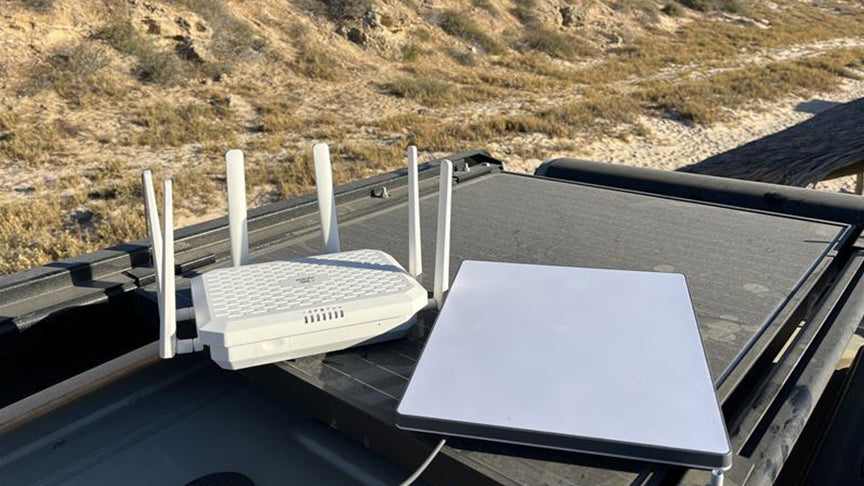
The XTR Pro 5G router requires a very simple setup that consists of screwing on antennaes and, optionally, installing the device into a wall.
I use the XTR Pro 5G router and, due to my van's setup, opted not to permanently mount it anywhere. I'm limited on space, so I store the device out of sight when not in use, and screw on the antennaes and plug it in when I need it. It takes all of two minutes—so easy. It generally takes the router two to three minutes to establish a connection and get going.
Starlink
Your Starlink setup experience will depend entirely on the type of Starlink you purchase. Setup for the original Starlink involves a bulky dish needing placement that keeps a clear line of sight to satellites. The newer mini dish option, which is what I have, features improved portability but still requires some planning.
Setting up involves finding a spot without obstructions (which, for me, usually means climbing onto my roof) and using the Starlink app to align the dish. This can take five to 10 minutes per location—plus another 15 to 60 minutes to fully analyze obstructions and determine satellite locations—so TravlFi does have the advantage here.
Speed & Performance Expectations
In general, upload and download speeds depend on your device and your location.
TravlFi
TravlFi's speeds depend on cellular network strength and the device you use. The 4G hotspot, for instance, supports speeds up to 180 Mbps, while the 5G XTR Pro router supports impressive speeds up to 700 Mbps. How close you are to cell towers and network congestion can affect performance. In my experience, TravlFi speeds are adequate for streaming, browsing, and most work tasks, though video call performance can suffer if you're on the fringes of cellular coverage.
Starlink
When Starlink has a clear view of the sky and is aligned, speeds are lightning fast. In incredibly remote areas, Starlink allows me to take video calls with zero lagging. Speeds regularly exceed 200 Mbps for downloads. While impressive, performance suffers when any obstructions are present or if the dish is misaligned.
Coverage Maps & Terrain Impact
For travelers based in the U.S., both Starlink and TravlFi provide extensive coverage.
TravlFi
TravlFi leverages most major cellular networks for coverage across the U.S., Canada, and Mexico. While the TravlFi coverage map extends throughout most of the U.S., connectivity is most robust in urban and suburban areas, while remote regions without strong cell signals typically experience weaker connectivity.
As Bokser puts it, on-the-ground performance doesn't always equate to what you see in coverage maps due to network congestion and traffic load, which is to be expected with cell-based service.
Starlink
The Starlink coverage map has grown exponentially in the last few years. Starlink's satellite-based system offers nearly global coverage, making it ideal for international adventurers and travelers spending time in very remote areas. Unlike cellular networks, Starlink can operate in places with little to no infrastructure, provided there's a clear view of the sky.
That said, terrain matters. Starlink won't work in heavily treed areas, within canyons, or near tall buildings. Where TravlFi can pick up at least some signal in dense forests with the help of a booster, Starlink simply can't get through the canopy.
Equipment Cost & Monthly Plans
Though there are differences in pricing between these two internet setups, what you ultimately pay comes down to the specific device and plan you decide to go with.
TravlFi
TravlFi is the easy choice for budget-conscious and seasonal travelers. The devices present a lower upfront investment, and TravlFi offers more plan options at different rates (starting at an affordable $19/month).
TravlFi offers several devices, including:
-
JourneyGo LTE Hotspot: a portable device with no installation required ($159)
-
JourneyGo 5G Hotspot: 5G connectivity in a portable hotspot ($299)
-
JourneyXTR Pro 5G Router: an advanced option, ideal for those who need consistent connectivity while moving ($399)
Learn more about the differences between Wi-Fi hotspots and routers.
TravlFi's plans are straightforward, with no contracts. They offer the following for 4G data:
-
2 GB/month ($19/month)
-
10 GB/month ($29/month)
-
25 GB/month ($49/month)
-
50 GB/month ($69/month)
-
100 GB/month ($89/month)
-
200 GB/month ($109/month)
-
Unlimited ($129/month)
For all plans, you can pause when needed and reactivate with no fee.
Learn more about how TravlFi’s unlimited internet plans compare to Verizon, T-Mobile, and AT&T.
Starlink
As we mentioned earlier, Starlink definitely costs more to get started compared to TravlFi:
-
Starlink Mini: $249 ($199 promotional for new customers)
-
Starlink Standard Kit: $349
-
Starlink Performance Kit: $1,999
As for plans, the Roam options are:
-
100 GB/month: $55/month
-
Unlimited: $175/month
And you can pause, but it will cost you $5 a month.
|
TravlFi |
Starlink Roam |
|
|
Cheapest device |
$159 (JourneyGo) |
$249 (Mini, $199 promo) |
|
Cheapest plan |
$19/month (2GB) |
$55/month (100GB) |
|
Unlimited plan |
$129/month |
$175/month |
|
Pause fee |
None |
$10/month |
|
Annual contract |
No |
No |
Which Is Right for You?
Having used both TravlFi and Starlink consistently for several months, it's easy for me to pinpoint when each one is best used. Based on my experience, here's how the two options compare in real-life scenarios.
Campgrounds & Urban RV Parks
TravlFi is the better choice for travelers hopping between areas with strong cellular coverage. Its portability and ease of setup are unmatched, and most established campgrounds and RV parks have solid cell coverage that makes the Starlink setup process feel like overkill. If your travel style mostly involves hookup sites and developed campgrounds, you can almost certainly skip the satellite investment.
Boondocking & Off-Grid Travel
Starlink excels for those spending extended time in remote areas. RV internet for boondocking is essentially what Starlink was built for—anywhere you have a clear view of the sky and need a connection, satellite is going to outperform cellular. The Mini dish is small enough that you can stash it when you're not boondocking and bring it back out when you head deep into the backcountry.
Remote Work & High-Usage Scenarios
If you're streaming or uploading large files regularly, Starlink's speeds are hard to beat despite the higher cost. But for remote workers who travel mostly through populated areas, TravlFi's multi-carrier coverage usually handles Zoom calls and file transfers without trouble. The reality for most full-time RVers working from the road, you'll want both, with cellular as the everyday connection and satellite for the days you're parked somewhere remote.
Yunna Takeuchi, travel expert and co-founder at City Unscripted, offers this advice:
"Every three months, map out where you've been to ensure your technology choice fits within the range of places you actually visit. If 80% of your travels are in cities or on the main highways, a cellular router is cheaper and saves setup time at every stop."
"On the other hand," she continues, "for those embarking on long road trips and driving deep into national forests or even crossing borders into foreign territories where cellular plans may not work at all (or cost extra if they do), satellite is a smart investment that makes 10 minutes of preparation at each new campsite worthwhile."
Budget & Occasional Travelers
TravlFi's lower upfront and monthly costs make it a solid option for casual or part-time travelers. The $19/month entry plan and pay-as-you-go flexibility mean you're not locked into anything, and you can pause your service entirely during stretches when your rig isn't in use. Starlink's $249 hardware cost (plus the $55-$175 monthly plans) is a tougher justification for someone who only camps a few weekends a year.
Combining Both Solutions
Both types of internet are subject to challenges. No system is perfect, Bokser explains, offering an anecdote: "I have worked on projects where a 1-bar 4G LTE signal from a highway access point could still produce 10 Mbps under extreme duress, while a full-strength Starlink user had to reboot the dish twice just to maintain a 2 Mbps Zoom call. The ground truth is that neither coverage map is fully honest until you overlay terrain, reflective signals, tower backhaul, and weather volatility."
This is just all the more reason to consider having internet redundancy when you live on the road—that is, utilize both and choose whichever works best at a given time. Yes, redundancy means paying more money per month, but it's more than worthwhile for those who live and work on the road full-time.
Some useful tips for switching between systems:
-
Default to cellular when you arrive at a new spot. TravlFi takes minutes to set up; Starlink takes longer. Save the satellite setup for when you actually need it.
-
Run a quick speed test before settling in. If TravlFi pulls 50+ Mbps and you're not doing heavy uploads, no need to deploy the dish.
-
Power-cycle one before troubleshooting both. If you’re feeling a slow connection, restart your TravlFi router first; if speeds don't improve, then check Starlink alignment.
-
Pause Starlink when you don't need it. That $10/month pause fee is much better than paying $175/month for service you're not using.
FAQs
Can I use Starlink while moving?
Starlink Roam plans support in-motion use, and the Mini and Standard kits both work in motion. That said, signal quality drops noticeably while driving, especially through forested or canyon-heavy stretches where you lose the line of sight to satellites. Most RVers use Starlink in-motion as backup connectivity rather than as a primary source.
Does TravlFi work in deep forests?
Sometimes, and that's actually one of TravlFi's underrated advantages over satellite. In dense forest areas where Starlink can't get a clear view of the sky, TravlFi can sometimes pick up a cellular signal from an in-range tower. Pairing it with a cell signal booster often pushes that signal up. Starlink, by contrast, simply won't work in heavily wooded areas regardless of any boosting equipment.
Is Starlink worth it for part-time RVers?
Starlink is worth it for RVers who need high-speed internet in remote areas, but the $249+ hardware cost and $55-$175 monthly plans (plus a $10/month pause fee) are hard to justify if you only camp a few weekends a year and park at established campgrounds. Cellular options like TravlFi, with $19/month entry plans and free pausing, almost always make more financial sense for part-timers.
Do I still need a cell plan if I have Starlink?
Most full-timers say yes. Starlink doesn't work in dense canopy or other obstructed areas—and it requires setup time at every new campsite. Keeping a cellular plan as backup means you have something to fall back on when satellite isn't working, plus a connection that's always live the moment you arrive somewhere new. Many full-time RVers run TravlFi as their primary daily driver and Starlink as their off-grid backup.
More Essential Reading for Digital Nomads
Which TravlFi Device Is Right for You?
TravlFi keeps you connected on the road. Not sure which device is best for you? Compare below.

Ready to test out our cellular plans alongside your Starlink? Learn more about how TravlFi can help.





Share: