


Cellular internet providers can distinguish between phone data and hotspot data—and that can be bad news for work and entertainment.

In This Article:
-
Key differences between mobile hotspots vs phone hotspots
-
When your phone hotspot is enough
-
When a dedicated mobile hotspot makes more sense for RVers
A phone hotspot (also called tethering) uses your smartphone’s cellular plan to create a small Wi-Fi network for devices like laptops or tablets. A mobile hotspot is a dedicated device designed specifically to provide internet access through cellular networks.
While both options can connect you to the internet on the road, they differ in speed, reliability, data limits, and the number of devices they support. Phone hotspots are convenient, but they often come with stricter data caps, faster battery drain, and performance limitations tied to your smartphone hardware.
Dedicated mobile hotspots, on the other hand, are built solely for cellular internet connectivity. They typically support more devices, offer stronger signal performance, and run on data-only plans designed for heavier usage.
TL;DR
A phone hotspot uses your smartphone to share cellular data with other devices, while a mobile hotspot is a dedicated device built specifically to provide internet access over cellular networks.
Experts Who Contributed to This Guide
-
Jeff Gwinnell, connectivity expert at TravlFi, expert-reviewed this guide for accuracy
-
Nathan Popp, TravlFi director of operations, provided insights for this guide
-
Amanda Capritto, the author, has traveled extensively across North America using various hotspots for remote work
What Is a Phone Hotspot?
A phone hotspot—also called tethering—is a feature that allows your smartphone to share its cellular internet connection with other devices. When you enable hotspot mode, your phone creates a small Wi-Fi network that nearby devices such as laptops, tablets, or other phones can connect to. Those devices then access the internet using the cellular data from your phone’s plan.

Most modern smartphones include built-in hotspot functionality. On both iOS and Android devices, you can usually turn it on in the network or connectivity settings and set a password to control who connects. Once activated, your phone essentially acts like a miniature wireless router, except it relies on cellular service rather than a wired internet connection.
How Phone Tethering Works
Phone tethering works by converting your smartphone’s cellular data connection into a local internet connection for other devices. Your phone receives data from the cellular network and then broadcasts it as Wi-Fi, allowing nearby devices to connect just like they would to a normal wireless router.
Once connected, the data traffic from those devices flows through your phone and out to the cellular network. Your phone essentially becomes a middleman: it receives requests from connected devices, sends those requests through the carrier network, and then returns the data back to the connected devices.
Some phones also support USB tethering or Bluetooth tethering, which connect devices directly without creating a Wi-Fi network. Wi-Fi tethering, however, is by far the most common option because it allows multiple devices to connect at once.
Pros of Using Your Phone as a Hotspot
-
No extra device
-
No extra monthly bill (sometimes)
-
Convenient for quick and occasional use
Only One Device Needed
One of the biggest advantages of using your phone as a hotspot is that you don’t need additional hardware. The device you already carry every day can double as an internet access point, eliminating the need to buy, charge, and manage another piece of gear.
This simplicity is great for travelers or remote workers who want to keep their setup minimal. If you only occasionally need internet on a laptop or tablet, enabling the hotspot on your phone is often faster than unpacking and configuring a separate device.
No Separate Monthly Bill
Many cellular plans include some level of hotspot access at no additional cost, which can make phone tethering the most affordable option. Instead of paying for a separate data plan, you’re simply sharing the data that’s already included in your phone plan.
However, this depends entirely on your carrier and plan details. Some providers limit how much hotspot data you can use each month before speeds are slowed, and others require a specific plan tier to enable tethering. For example, Verizon offers a popular add-on of 100 GB of hotspot data for $10 more per month.
For light use like checking email or uploading documents, it can still be a cost-effective way to get another device online.
Very Convenient
Phone hotspots are especially useful when you need internet access quickly and don’t want to set up additional equipment. Turning on a hotspot typically takes just a few seconds, making it an easy solution when Wi-Fi is unavailable.
This convenience makes phone tethering well suited for short tasks: sending a few files from a laptop, joining a quick video call while traveling, or connecting a tablet during a flight delay. For quick on-the-go needs, the simplicity of using your phone often makes an added hotspot plan worthwhile.
Limitations of Phones as Hotspots
-
Data caps
-
Rapid battery drain
-
Overheating
-
Slower speeds under load
-
Limited range
-
Often deprioritized on networks
Limited Connection Stability
Phone hotspots, while very functional, often have limitations in connection stability. Traditional hotspots that depend on one network provider may cause inconsistent performance depending on where you are. In areas with weak signals or network congestion, this can result in incredibly frustrating interruptions.
Data Deprioritization
Plus, “cell phone services still prioritize voice over data,” says Jeff Gwinnell, connectivity specialist at TravlFi. “On the same cell plan, services such as phone data, SMS, hotspot and tethering can all be treated and priced differently.”
According to Nathan Popp, TravlFi’s director of operations, most consumer phone plans include restrictions on hotspot data, and many budget-friendly unlimited cell data plans don’t even offer hotspot capabilities.
“Travelers often tell us that they have an unlimited data plan with their carrier, so they’ll just use their phone hotspot,” Popp says. “But what many people don’t realize is that carriers can differentiate between regular phone data usage and data used through a phone’s hotspot feature.”
Throttling
Gwinnell points out, too, that phone hotspot plans can be throttled with just regular use of streaming. “More often than not, data usage limits are met very quickly and result in heavy throttling- even with so-called unlimited plans,” he explains.
“Even worse, these limitations could remain in effect until the next billing cycle,” Gwinnell says. “This is not ideal for full time travelers who need bandwidth to support daily use.”
With these types of restrictions in place, some people might find themselves constrained by contracts or plans that do not adapt to their changing connectivity requirements. This lack of flexibility can be frustrating, especially for those seeking tailored solutions that match their usage and travel schedules.
What Is a Dedicated Mobile Hotspot?
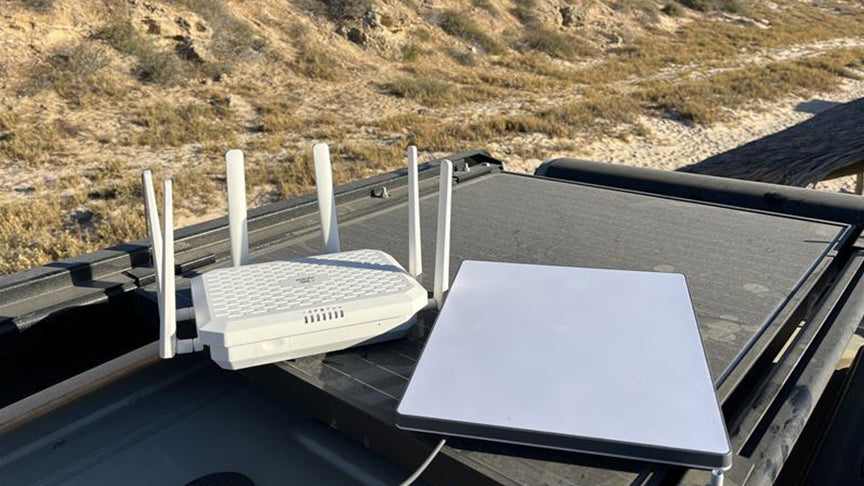
A dedicated mobile hotspot is a small device designed specifically to provide internet access using cellular networks. Unlike a phone hotspot, which shares your smartphone’s data connection, a mobile hotspot operates as its own piece of hardware with a separate data plan. It connects to nearby cell towers and broadcasts a Wi-Fi signal that other devices can use to get online.
These devices are often called Mi-Fi devices, a term originally popularized by Novatel Wireless (now known as Inseego) for its portable hotspot product line. Today, many carriers and internet providers offer their own versions, including portable hotspots designed for travel, remote work, and RV living.
Dedicated hotspots function similarly to a home router, but instead of relying on cable or fiber internet, they pull data from cellular networks such as Verizon, AT&T, or T-Mobile. Because the device is built solely for connectivity, it typically includes stronger antennas, more powerful radios, and batteries designed for extended use compared to smartphones.

How Mobile Hotspots Work
A mobile hotspot works by connecting to a cellular network and converting that connection into a local Wi-Fi signal for nearby devices. The device contains a cellular modem and antenna that communicate with nearby cell towers, much like a smartphone does when it accesses mobile data.
Once the hotspot establishes a cellular connection, it creates a private Wi-Fi network that devices such as laptops, tablets, and smart TVs can join. Data from those devices passes through the hotspot, travels over the cellular network, and returns to the connected device with the requested content.
Because the device is dedicated to this task, it can often support more connected devices and heavier data use than a phone hotspot. Many models also include features such as external antenna ports, advanced network management settings, and larger batteries designed to power hours of continuous internet access.
Advantages of Dedicated Mobile Hotspots
-
Stronger antennas
-
Better signal reception
-
Higher device capacity
-
External antenna compatibility
-
Less throttling (plan-dependent)
-
Built for 24/7 operation
Frees Up Your Phone
A mobile hotspot device will free up your phone’s internal resources and battery life, according to Gwinnell. “With a mobile hotspot, the device’s battery life is dedicated to keeping you connected,” he says—not doing all of the tasks your phone does, with connectivity on top. Plus, a dedicated Wi-Fi device means you can easily make calls and use other functions on your phone while the mobile hotspot stays connected to a charger.
Supports More Device Connections
Mobile hotspots can support more users and devices than a typical cell phone’s hotspot function, too. “The mobile hotspot creates its own secure WiFi network and often has enhanced Wi-Fi options built-in that are not always available in a typical cell phone hotspot,” Gwinnell explains.
Increased Network Range
Compared to a cell phone, a mobile hotspot may include additional benefits such as increased Wi-Fi network range, device tethering (without penalty), and doubling as a battery pack, Gwinnell says. Some mobile hotspots even provide an Ethernet port for wired devices.
Multi-carrier devices, like those that TravlFi offers, and data plans that are not tied to one specific network can further enhance connectivity options, he says. This is helpful in situations with areas that have better coverage with a specific provider or when congestion is a factor.
Prioritized for Mobile Cellular Data
Importantly, mobile hotspots with mobile hotspot plans are prioritized for data only, Gwinnell points out. “As such, mobile data plans are classed differently, with an emphasis on paying for and using large amounts of data. This is more ideal for a full-time traveler that relies on email, video and streaming.”
Downsides of Dedicated Mobile Hotspots
-
Requires an additional device
-
Requires a separate data plan
-
Higher upfront cost
Requires an Additional Device
Using a dedicated hotspot means adding another piece of hardware to your setup. That device needs to be carried, charged, updated, and kept track of alongside your phone, laptop, and other electronics.
For minimalists or travelers trying to simplify their gear, this extra device can feel unnecessary, especially if you already have a smartphone capable of tethering. It’s one more item that can run out of battery, get misplaced, or require troubleshooting on the road.
Requires a Separate Data Plan
Most dedicated mobile hotspots require their own data-only service plan, separate from your smartphone plan. That means managing another monthly subscription and potentially another provider account.
Depending on the carrier and plan structure, this can add a recurring cost to your connectivity setup. While some hotspot plans provide larger data allowances than phone tethering, they still represent an additional line item in your monthly budget.
Higher Upfront Cost
Unlike phone tethering—which uses hardware you already own—dedicated mobile hotspots require purchasing the device itself. Depending on the model and capabilities, that initial cost can range from around $100 to several hundred dollars.
For RVers who depend on cellular internet for work or full-time travel, the investment is typically worthwhile. But for people who only need internet occasionally while traveling, the upfront expense may not justify the benefits.
Mobile Hotspot vs. Phone Hotspot: Side-by-Side Comparison
|
Phone Hotspot (Tethering) |
Dedicated Mobile Hotspot |
|
|
Pricing |
No extra cost for a new device; plans may be included with your phone data plan or as little as $10/month for hotspot add-ons |
Initial investment of $100-$600+, as well as a separate monthly data plan ranging from $10-$200/month |
|
Typical speeds |
Often slower or less consistent because the phone is handling both connectivity and hotspot functions at once |
Typically faster and more stable because the device is optimized solely for data connectivity |
|
Device support |
Usually supports 3-10 devices, depending on the phone and carrier |
Often supports 10-30+ devices, depending on the hotspot hardware |
|
Coverage |
Limited to the phone’s internal antenna strength and carrier network |
Often better reception thanks to stronger antennas and advanced cellular modems |
|
Battery life |
Drains your smartphone battery quickly |
Built with larger batteries designed for extended hotspot use (often 8-24 hours) |
|
Data impact |
Uses your regular phone data plan and may slow speeds for everything on your phone |
Uses a separate data-only plan, keeping phone data untouched |
|
Data limitations |
Many carriers impose strict hotspot caps (often 5-50 GB before throttling) |
Plans are typically designed for heavier use and may allow larger or unlimited data allotments |
|
Best use cases |
Quick connections, occasional laptop work, travel emergencies |
Remote work, RV travel, vanlife, multi-device households, and long-term mobile internet |
When a Phone Hotspot Is Enough
-
Weekend camping
-
Emails and light browsing
-
When you need backup internet (redundancy for full-time travelers who work in their RV)
-
Single device connection
-
Quick connections on the go
When a Dedicated Hotspot Is Worth It
-
Remote workers
-
Full-time RV or van living
-
Streaming
-
Multiple device connections
-
Rural or fringe cellular coverage areas
Hotspot Performance Differences RV Owners Should Know
For RVers, the choice between a phone hotspot and a dedicated mobile hotspot directly affects connection stability, device support, and power consumption. RV travel often takes you far from dense cellular infrastructure, where signal strength fluctuates and bandwidth is limited. Under those conditions, the equipment you use to connect can make a noticeable difference, especially if you are a digital nomad who needs to use video conferencing tools and other high-data software.
Signal Strength in Rural Areas
Cellular performance often drops in rural areas where towers are farther apart and signal strength is weaker. In these environments, the hardware inside your device becomes an important factor in how well you can stay connected.
Dedicated mobile hotspots typically include larger antennas and more advanced cellular modems than smartphones. This can allow them to maintain a usable signal in areas where a phone struggles to hold a steady connection. Some hotspot devices also support external antennas (e.g., signal boosters), which can significantly improve reception when parked in remote campgrounds or dispersed camping areas.
A phone hotspot, by comparison, relies on the smartphone’s built-in antenna system. While modern phones are very capable, they’re optimized for general mobile use rather than long-term data transmission in fringe coverage zones.
Network Prioritization and Throttling
Many cellular carriers manage network traffic by prioritizing certain types of data connections over others. Hotspot traffic—especially phone tethering—often receives lower priority during times of network congestion.
This means your connection may slow down more quickly when using a phone hotspot, particularly if your plan includes a capped amount of hotspot data. Once you exceed your data cap, carriers frequently reduce speeds for tethered devices.
Dedicated hotspot plans are typically structured differently. Data-only plans designed for mobile hotspots may include larger high-speed allowances or different prioritization policies, especially if they’re designed for home internet or mobile work setups. The specifics vary by provider, but RVers who rely heavily on cellular internet often find that dedicated hotspot plans offer more predictable performance.
Multi-Device Load
Multiple devices compete for bandwidth at the same time. A typical setup in an RV might include a laptop for work, a phone syncing data, a tablet, and a streaming device connected to the RV’s television.
Phone hotspots can handle a handful of devices, but performance degrades as more devices connect and begin transmitting data simultaneously. Smartphones are not optimized to function as full-time routers, and heavy data traffic can strain both the device’s processor and battery.
Dedicated mobile hotspots, on the other hand, are designed to manage larger numbers of connected devices.
Many models support 10, 20, or even more simultaneous connections while maintaining more consistent performance. For RVers traveling with family members—or anyone working remotely while someone else streams or browses—this added capacity makes a big difference.
Electrical Pull
When you’re living or traveling in an RV, power consumption is critically important, particularly when relying on batteries or solar power while boondocking. Every device running in the background draws energy from your system.
Using a phone as a hotspot can quickly drain its battery, which usually means keeping the phone plugged in while tethering. This constant charging cycle can generate heat and accelerate battery wear on your phone.
Dedicated mobile hotspots draw power as well, but they’re built for continuous connectivity and often use larger batteries or efficient power management systems.
That said, the battery draw from a dedicated mobile hotspot is typically larger than that from a cell phone. If you have a limited electrical system, you’ll probably notice the drain on your battery from a dedicated hotspot.
Best Option for Different Types of RVers
|
Weekend/occasional campers |
Phone hotspot |
|
Solo travelers |
Phone hotspot |
|
Full-time RVers and vanlifers |
Dedicated mobile hotspot + phone tethering for backup |
|
Remote workers and digital nomads |
Dedicated mobile hotspot + phone tethering for backup |
|
Couples and families |
Dedicated mobile hotspot |
Can—and Should—You Use Both?
Redundancy is never a bad idea when it comes to connectivity on the road. This is especially true if you are working while living in an RV or van, and/or you travel extensively over a wide area with daily or weekly movement. When you’re on the go, a cell phone hotspot wins for convenience and backup internet, while a dedicated mobile hotspot serves as your primary source of connectivity when parked.
FAQ
Is a hotspot safer to use than public WiFi?
There’s no argument about it: Using your own mobile hotspot is safer than using public WiFi, says Jeff Gwinnell, TravlFi connectivity specialist. But don’t forget to change the default WiFi passwords of your mobile hotspot or phone hotspot. “Make sure to use a mix of numbers, letters and special characters for enhanced security,” Gwinnell says. “And never leave any WiFi network open or unsecured on your cellphone or mobile hotspot.”
How can I get a better signal on my hotspot?
According to connectivity specialist Jeff Gwinnell, you can improve hotspot signal by keeping your mobile hotspot in an accessible location with good ventilation and experimenting with placement around the vehicle or RV.
What’s better, a phone hotspot or mobile hotspot?
A dedicated mobile hotspot is always going to perform better than a phone hotspot, says TravlFi connectivity specialist Jeff Gwinnell. This is because mobile hotspots are designed to be used for data only on a cellular network. They are made with one specific purpose in mind—create a private local network for sharing internet—whereas phones are multi-purpose and cell phone hotspot plans typically have the lowest network priority.
More Essential Reading for RV Owners
-
TravlFi vs. Starlink: A Full-Time Vanlifer Compares Cost, Speeds, and Coverage
-
The 4 RV WiFi Options Every Digital Nomad Needs to Know About
Which TravlFi Device is Right for You?
TravlFi keeps you connected on the road. Not sure which device is best for you? Compare below.



Share: