


The best RV Wi-Fi plan for you depends entirely on what type of traveler you are—and you may need more than one system.

In This Article
-
The 4 main types of RV internet
-
A closer look at the full-time setup Amanda actually uses
-
How to choose the right RV Wi-Fi setup for your travel style
-
FAQs
Take it from a full-time road traveler of more than one year: No RV Wi-Fi system works everywhere. Nope, not a single one. While we are proud of what we've created here at TravlFi, we'd be remiss not to inform our network of travelers about other mobile internet solutions. Different systems work in different situations, and if you travel far and wide, you will likely find yourself in need of various solutions.
To help you sort through the top RV internet options on the market, we sat down with full-time traveler Amanda Capritto, who has driven her camper van from Miami to Anchorage to Cabo San Lucas and countless places in between—all while working remotely. "After a year-plus of travel, I've realized that it's nearly impossible to choose just one Wi-Fi system if you want to work full-time while traveling and also have a lot of fun and freedom," she says. Below, she walks through her four-part RV internet setup and when she uses each device.
TL;DR
Full-time vanlifer Amanda Capritto runs a four-part RV internet setup: TravlFi for daily use, Starlink for off-grid spots, her phone hotspot for quick needs, and a cellular booster for weak-signal areas. No single device works everywhere, but the right combination of these top RV internet options is what keeps you online.
Experts Who Contributed to This Guide
-
Amanda Capritto, the subject of this guide, is a full-time vanlifer with more than two years of experience using RV internet solutions on the road.
-
This article was updated by Lauren Keary, an experienced travel journalist.

RV Internet: One Traveler's 4-Part Setup
Most full-time RVers and vanlifers eventually realize that one device can't cover every scenario on the road. Here are the four categories Amanda relies on, each filling a different gap:
-
Satellite internet: Best for travelers who spend significant time in remote or off-grid areas with little to no cellular signal. Speeds have improved, but equipment costs are high and portability varies.
-
Cellular router (or multi-carrier hotspot): The most reliable option for most RVers. Uses nationwide LTE and 5G networks through hotspots, routers, or SIM-based data plans. Coverage and speed depend on your carrier and location.
-
Phone hotspot: Tethering your smartphone to a laptop or other device via your phone plan. Quick to use, no extra device required, but limited by your phone plan's data and where your phone has signal.
-
Cellular booster: Not a standalone internet source. It amplifies a weak cell signal so your phone, hotspot, or router can pick up something usable in fringe coverage areas.
Side-by-Side Comparison
|
Type |
Best For |
Coverage |
Setup |
Typical Cost |
|
Cellular Router/Hotspot |
Everyday use anywhere with cell signal |
Most populated U.S. (and Canada/Mexico with multi-carrier devices) |
Power up and log in |
$159+ device; $19-$129/mo plans |
|
Satellite Internet |
Off-grid travel and remote boondocking |
Anywhere with a clear view of the sky |
Dish positioning and app alignment |
$249+ hardware; $50-$165/mo plans |
|
Phone Hotspot |
Quick, on-the-go connections |
Wherever your phone has signal |
Toggle on in phone settings |
Add-on to existing phone plan |
|
Cellular Booster |
Stretching weak cell signals |
N/A (amplifies whatever signal is there) |
Install antenna and run cables |
$200-$700 hardware; no subscription |
A Closer Look at Amanda's 4-Part RV Internet Setup
Here's a closer look at the four Wi-Fi systems Amanda uses to maximize productivity on the road.
Multi-Carrier Hotspot with eSIM
Best for: traveling closer to cities and anywhere with sky obstructions (treed areas, canyons, tall buildings)
Examples:
-
TravlFi JourneyGo 4G LTE Hotspot
-
TravlFi JourneyGo 5G Hotspot
-
TravlFi XTR Pro 5G Router
-
Simo Solis 5G Mobile Hotspot
-
Simo Solis Lite 4G LTE Mobile Hotspot
-
HomeFi Wireless 4G LTE Hotspot
-
Redzone Portable Wi-Fi
Pros:
-
Works anywhere cell signal is available
-
Pings multiple carrier networks
-
Automatically picks up the strongest signal near you
-
Some offer a signal scan function
-
Most offer pay-as-you-go service with no contracts
-
Some devices don't need to stay plugged in
-
Functions even when the sky is obstructed by trees or buildings
-
Easy to set up with no installation required
Cons:
-
Subject to throttling and network congestion
-
Relies on cell coverage, limiting connection in remote areas
Why travelers love it:
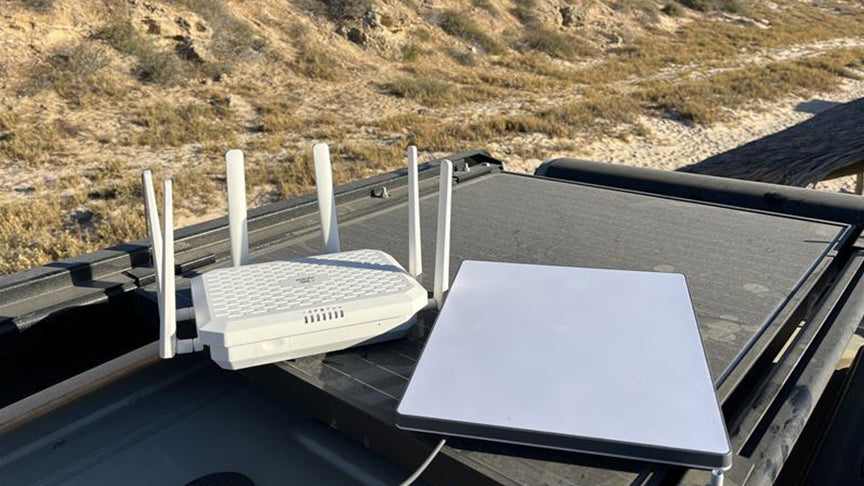
Like regular portable hotspots, eSIM-based multi-carrier hotspots connect to cellular networks. The difference is that multi-carrier hotspots connect to multiple networks, instead of just one. For instance, the TravlFi JourneyGo 5G hotspot utilizes the networks of the major cellular providers in the U.S., Canada, and Mexico; a Verizon hotspot, however, only connects to the Verizon network (as is true with a T-Mobile, AT&T, or other specific provider hotspot).
"My phone provider is Verizon, so I started van life with a Verizon hotspot. It didn't take long before I realized how significantly that limited my travels," Amanda says. "I upgraded to a multi-carrier hotspot after just a couple of weeks, and it made working on the road so much easier."
TravlFi is one of the best options for Wi-Fi for RV travel thanks to its flexibility, affordability, and reliability. With devices designed to ping multiple carrier networks and the ease of pay-as-you-go service, TravlFi makes it simple to stay connected wherever your travels take you. Unlike many other options, TravlFi's hotspots and routers don't require installation or contracts, making them an ideal choice for RVers of all kinds.
"Though these devices are limited by the bounds of cell network coverage, with a cell booster, a TravlFi device enables you to travel further than you might expect," Amanda says. "I've successfully used TravlFi in several places where it seemed that cell service shouldn't exist. And yet, I was able to work, send iMessages, and check social media."
Satellite Internet
Best for: remote and rural areas where you have an unobstructed view of the sky
Examples:
-
Starlink Mini
-
Starlink Standard Kit
-
Starlink Performance Kit
Pros:
-
Global coverage
-
Works where cell signal doesn't reach
-
Typically provides fast upload and download speeds
-
No data caps on the Unlimited Roam plan
-
Roam plan eliminates the need for a residential tether
Cons:
-
Expensive equipment
-
Setup can be complex
-
Performance is heavily affected by storms
-
Requires a clear view of the sky
-
Subject to satellite latency
Why travelers love it:
According to Amanda, Starlink is the no-brainer choice for remote, mostly flat areas. Some of the places she's utilized her Starlink Mini include Death Valley National Park in eastern California, the desert mountains of San Diego County, and the beaches and deserts of the Baja Peninsula in Mexico.
Starlink allows nomads to travel beyond the bounds of cellular service and public Wi-Fi networks, enabling them to work from quite literally almost anywhere. Even in incredibly remote locations, the low-orbiting satellites provide rapid upload and download speeds, leading to seamless video calling, entertainment streaming, and anything else.
The catch? For the system to work like this, you must have a clear view of the sky at all times. This means it's not the best fit for travelers who spend the majority of their time in densely forested areas or cities.
"I wouldn't necessarily say its use is limited for most travelers, especially RV-ers and van-lifers who love the desert and chaparral areas like Southern California," says Amanda. "It's just something to be aware of if you're planning on spending a lot of time in, say, the Pacific Northwest. You won't get much use out of it there."

Phone Hotspot
Best for: quick, easy work and last-minute, on-the-go tasks
Examples:
-
Tethering your smartphone to a laptop via an add-on of your phone plan
Pros:
-
Doesn't require a separate device
-
If your phone works, the hotspot works
-
Little to no setup
-
Usually a small fee in addition to your phone bill
-
No need to plug anything in or wait for a device to boot up
Cons:
-
Subject to throttling and congestion
-
Typically only supports a couple of devices
-
Only works where your phone works
Why travelers love it:
If you have an eSIM hotspot, you probably won't find yourself in need of a cell phone hotspot very often. However, there are certainly times when having one comes in handy for adventurous travelers.
For Amanda, her phone hotspot comes into play for last-minute, on-the-go internet needs. "Due to my van setup, I don't travel with my TravlFi router or Starlink dish plugged into an outlet, so being able to connect my laptop to my phone in a pinch is helpful," she says. "I also use it for a private connection when at airports, coffee shops, or other places away from my van."
Cellular Booster
Best for: use in conjunction with a cellular hotspot or your phone
Examples:
-
KING Extend Go - Multi-use Portable Cell Signal Booster
-
weBoost Drive Reach RV II
-
HiBoost 15K Mate Pro
Pros:
-
Strengthens an existing cell signal
-
Helps cellular-based hotspots provide a better local Wi-Fi network
-
No subscriptions required
Cons:
-
Requires installation, including running wires
-
Pricey up-front cost
Why travelers love it:
A cell signal booster helps strengthen the existing signal that your cell phone or hotspot picks up. This is crucial when on the fringes of cellular networks, where signal exists but is spotty or weak. Cellular boosters can enhance your Wi-Fi setup by improving weak signals, which is what makes them such a useful add-on.
For Amanda, her signal booster has enabled her to work in places like the backcountry of Big Bend National Park, where her phone had a weak one-bar signal without the booster. With it, she got two bars and was able to do basic tasks like clear her email inbox and respond to client messages after a day of hiking.
"I consider my cell booster an essential component of my van internet setup," she says. "And it's not just for remote areas. It can help even in cities, and is often the difference between dropped video calls and smooth conferences."
How to Choose the Right RV Wi-Fi Setup for You
The right RV internet setup comes down to where you travel, how you use the internet, and how much redundancy you can justify. For most full-timers, running at least two of the options above keeps it so that you're rarely caught completely offline.
If you mostly stay in campgrounds and developed RV parks, a solid multi-carrier hotspot or router (like TravlFi) handles 95% of what you need. Established campgrounds usually have reliable cell coverage, and a portable hotspot saves you the cost and complexity of satellite. A cellular booster can help if you regularly camp in weaker-signal areas, but it's not a necessity.
If you need consistent speeds for remote work, run a multi-carrier cellular setup as your daily driver and add a cellular booster for fringe-coverage stops. If your work depends on uninterrupted Zoom calls or Cloud uploads, layering Starlink on top gives you a backup for the days cellular cuts out. This dual setup costs more, but the reliability is worth it for full-time remote workers.
If you go off-grid often, Starlink is basically a must-have. The Mini dish is compact enough that it stays packed away during cellular-friendly trips and comes out when you head into the backcountry. Keep a cellular hotspot for travel days and populated stops where setting up the dish isn't worth the effort.
Frequently Asked Questions
How much does Wi-Fi cost in an RV?
Costs for RV internet options vary, ranging from $10/month for basic add-ons to $175+/month for high-speed, unlimited plans like Starlink Roam.
Can I use Starlink Residential in my RV?
Starlink Residential can work, but Starlink Roam is better suited for RV travel as it provides global coverage and mobility with no need for a fixed address.
Can I put a Wi-Fi router in my RV?
Yes! Many portable routers, such as the TravlFi XTR Pro 5G, are specifically designed for RVs and offer a stable Wi-Fi network.
Do RV Wi-Fi boosters work?
Yes, boosters amplify weak cell signals, helping your hotspot or devices maintain stronger and more reliable Wi-Fi for campers.
How do you get high speed Internet in an RV?
You can achieve high-speed internet using a combination of eSIM hotspots, satellite internet, and cellular boosters to increase both coverage and speed.
More Essential Reading for RVers
-
An RV Internet Expert Shares Tips for Optimal RV Wi-Fi Setup
-
Unlimited Internet for RVs: Compare TravlFi, T-Mobile, Verizon, and More
Which TravlFi Device Is Right for You?
TravlFi keeps you connected on the road. Not sure which device is best for you? Compare below.

Don't let the fear of being disconnected be the reason you don't live out your dreams of road life. It is 100% possible to work from an RV and have success as a full-time traveler with the right RV Wi-Fi, like TravlFi's 4G and 5G data plans.




Share: